Digital Image Capture for Analog SEM
Quartz PCI Slow-Scan provides Digital Image Capture for Analog SEMs from any manufacturer. Our USB digital image acquisition module and Windows-based Quartz PCI software capture images from your Analog SEM in real-time and allow them to be saved in standard image formats.
Quartz PCI Lab acquires high-resolution, slow-scan digital images from Analog SEM and STEM instruments from any manufacturer without interfering in any way with normal microscope operation.
- The quality of PCI's SEM and STEM digital images is unsurpassed.
- PCI can match the resolution of your microscope's scan generator up to 4,000 lines.
- Image size is continuously variable up to the maximum size supported by the microscope.
- PCI Lab can be programmed to match your SEM's aspect ratio exactly, ensuring that pixels are square and that measurements are accurate.
Upgrade Your Old Analog SEM with Digital Imaging
Updating your SEM with the latest digital image acquisition capabilities improves productivity and reduces operating costs.
- E-mail clients their results
- Include images in reports
- Easily retrieve historical data
- Eliminate film and photographic materials and processes
The Slow-Scan version of Quartz PCI Lab adds high quality, digital image capture and processing capability to any Analog SEM or STEM for a very affordable price. Convert your Analog SEM to digital imaging today!
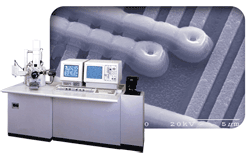
Passive Capture for SEM Digital Imaging
Quartz Imaging pioneered the use of passive capture for high resolution SEM digital image capture. The benefits of passive image acquisition for SEM are now widely recognized.
- All SEM controls remain fully operational even while acquiring an image.
- For most SEMs, the micron marker and other data are automatically acquired with the image.
- Full advantage is taken of the SEM's own sophisticated filtering and scan generation electronics. The captured image is identical to the film output of the instrument.
USB Capture Hardware
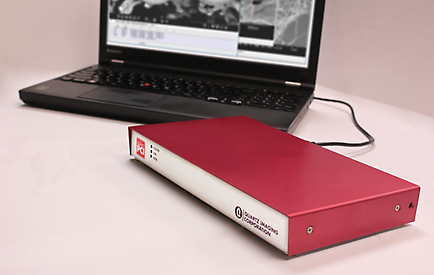
Quartz PCI Slow-Scan uses our custom-developed digital image acquisition hardware which connects to your computer via a USB port. There is no board to go inside the computer — you can even use a laptop. Cables are included to connect to your SEM.
- Windows® XP, Vista, 7 & 8 — 32 and 64 bit compatible
- No slot required in PC
- Plugs into a USB port
Supported Manufacturers
Digital image acquisition can be added to SEMs and STEMs from any manufacturer including:
- Amray
- ISI
- Philips
- Cambridge
- JEOL
- Topcon
- Camscan
- Leica
- Zeiss
- FEI
- Leo
- Hitachi
- Nanolab
Please *contact us* about your specific model. We can handle other imaging devices, such as Auger, as well.
More than Image Capture
Quartz PCI Slow-Scan does more than image capture. For around the same price as competing systems, you also get the complete Quartz PCI software package for image capture, processing, measuring, annotating, archiving, reporting and more.
Specifications
PCI Slow-Scan Digital Image Acquisition Module for SEMs
- Digitizes any SEM or STEM.
- Matches resolution of microscope's scan generator up to 4,000 lines.
- Accommodates any image aspect ratio.
- Frame averaging, integration.
- Real-time signal mixing.
- Power Input: 100 ~ 240 V, 50 ~ 60 Hz
- Passive system — digital beam control not required.
- Continuously variable image size.
- 8- or 12-bit acquisition.
- Simultaneous two channel acquisition.
- USB 2.0 computer interface.
- FCC Class A device.
Measuring
- Complete set of measurement tools for measuring distances, angles and shapes in the image.
- Values automatically update when measurements are adjusted with the mouse.
- Measurement results displayed in spreadsheet grid and can be easily pasted into Excel or other software.
- Numerous options for displaying arrow heads, extension lines, projections etc.
- Micron marker function for adding micron marker to images, such as from light microscope, that do not contain a micron marker.
- Measurement Sequence Function allows repeated sequence of measurements to be pre-programmed.
- Optional module for measuring semiconductor device features.
Archiving
- Images can be stored in most popular file formats including TIFF and JPEG.
- Workgroup Database included as a standard feature. Enterprise Database available as an option. Workgroup Database can be easily upsized to Enterprise version.
- Database tracks jobs, sessions, samples, images and external documents including multimedia files.
- Permits composition of sophisticated database queries.
- Robust record locking and file sharing in networked environments.
- "Send To" feature allows documents from other applications to be sent directly to the database.
- Scan feature automatically searches disks and network devices for images and allows them to be added to the database.
- ODBC compliance ensures compatibility with third-party tools such as Microsoft® Access.
- Burn CDs and DVDs from inside PCI.
- Full support for removable media.
- Auto-Save Acquired Images.
Processing
- Image resizing and fine image rotation.
- Ability to reverse raster rotation, using angle information contained in image file.
- Tilt correction.
- SEM resolution measurement.
- Image mixing using various arithmetic operators.
- "Plug-in" interface for user-developed processing and analysis code.
- Histogram functions for contrast, brightness and gamma adjustment.
- Smoothing, sharpening and median filtering functions.
- Display functions for zooming, panning, false coloring and slide show display.
- Construction of anaglyph stereo image from separate left and right images. Includes ability to align stereo pair.
- Spectrum zooming/scrolling with mouse wheel.
- Spectrum auto-scaling and default display region.
- Spectrum automatic peak labeling.
- Spectrum automatic peak identification.
- Spectrum KLM line markers.
- Spectrum cursor displays energy, counts and possible x-ray lines.
Acquiring
- Options available to acquire images from virtually any image producing device including slow scan, TWAIN, video capture and digital file import.
- "Spider" system automatically loads images saved to a "hot" folder.
- Most popular file formats can be imported.
- Can import files, and retain calibration information, from most EM manufacturers including FEI, Hitachi, JEOL, Phenom, Tescan and Zeiss.
- Support for 24-bit color and 8- and 16-bit grayscale images.
- Imports EMSA format x-ray spectra.
- Common user interface for all image sources enhances ease of use.
PCI-CFR
- Acquires images and stores them consistent with the requirements of 21 CFR Part 11.
- Maintains an audit trail that records all changes to each image, retention of all versions of each image.
- Use of encryption and digests to ensure data integrity.
- And the ability to export data as digitally signed PDF files.
- Works with the Windows security system to provide password protection, permissions and user roles.
Reporting
- Comprehensive built-in report editor.
- Permits layout of images, text and drawing elements.
- Any number of pages.
- Grid/Snap-to-grid features.
- Master page.
- Automatic population of database fields in the report.
- Automatic generation of reports from templates.
- Export reports in PDF or Microsoft Word and PowerPoint formats.
- Secure PDF Export.
Annotating
- Complete set of tools for adding text, arrows and geometric shapes to images.
- Drawing tools operate on separate overlay layer. Overlay elements can be moved or deleted without interfering with each other or the underlying image.
- Drawing elements can be rotated.
- Grid overlay can be displayed on image.
- Default overlay burn-in option allows all images to be permanently marked, such as with company logo or confidential indicator.
X-Ray Spectrum Viewing
- Spectrum zooming/scrolling with mouse wheel.
- Spectrum automatic peak labeling.
- Spectrum KLM line markers.
- Spectrum auto-scaling and default display region.
- Spectrum automatic peak identification.
- Spectrum cursor displays energy, counts and possible x-ray lines.
Other
- Dual Monitor and Widescreen Support.
- Windows 8 and 10 support.
- Runs on 64-bit operating systems.
- Output to any Windows®-supported printer.